
Spaceremit WooCommerce Plugin
إضافة رسمية لربط متجرك مع بوابة الدفع Spaceremit بسهولة وأمان
Download Plugin v1.0.0 | WordPress 6+ | آخر تحديث: Jan 24
Credit Card Processing: Accept major credit cards such as Visa, Mastercard and more, providing your customers with the convenience of paying with their preferred method.
Local Payment Methods: Cater to the specific preferences of your target audience by offering a variety of local payment methods, including bank transfers, e-wallets, and alternative payment solutions.
إضافة رسمية لربط متجرك مع بوابة الدفع Spaceremit بسهولة وأمان
Download Plugin v1.0.0 | WordPress 6+ | آخر تحديث: Jan 24

<script>
const SP_PUBLIC_KEY = "YOUR_PUBLIC_KEY"; //Your website public key
const SP_FORM_ID = "#spaceremit-form"; // Identifier for the form
const SP_SELECT_RADIO_NAME = "sp-pay-type-radio"; // Name attribute of radio buttons

const LOCAL_METHODS_BOX_STATUS = true; // Status of local payment methods box
const LOCAL_METHODS_PARENT_ID = "#spaceremit-local-methods-pay"; // Identifier for the container of local payment methods

const CARD_BOX_STATUS = true; // Status of card payment box
const CARD_BOX_PARENT_ID = "#spaceremit-card-pay"; // Identifier for the container of card payment
let SP_FORM_AUTO_SUBMIT_WHEN_GET_CODE = true; // Flag indicating whether the form should automatically submit when getting a code

// Callback function for successful payment
function SP_SUCCESSFUL_PAYMENT(spaceremit_code) {}
// Callback function for failed payment
function SP_FAILD_PAYMENT() {}
// Callback function for receiving message
function SP_RECIVED_MESSAGE(message) {alert(message);}
// Callback function for needing authentication
function SP_NEED_AUTH(target_auth_link) {}
</script>SP_PUBLIC_KEY: This constant holds the public key of your website. It's a unique identifier used for authentication with the Spaceremit service. Replace <YOUR_PUBLIC_KEY> with the actual or test public key of your website that provided by Spaceremit.Websites And Keys
SP_FORM_ID: This constant defines the identifier for the form element. It helps in locating and manipulating the form within the HTML document.
SP_SELECT_RADIO_NAME: This constant specifies the name attribute of the radio buttons used for selecting the payment method. It's used to group the radio buttons together.
LOCAL_METHODS_BOX_STATUS: This variable determines the status of the container for local payment methods. If set to true, it means that the container will be enabled and displayed; otherwise, it will be hidden.When it's disabled, you can manually remove the radio input from the form.
LOCAL_METHODS_PARENT_ID: This constant specifies the identifier for the container element that holds the local payment methods. It's used to manipulate the container within the HTML document.
CARD_BOX_STATUS: Similar to LOCAL_METHODS_BOX_STATUS, this variable determines the status of the container for card payment methods.When it's disabled, you can manually remove the radio input from the form.
CARD_BOX_PARENT_ID: Similar to LOCAL_METHODS_PARENT_ID, this constant specifies the identifier for the container element that holds the card payment methods.
SP_FORM_AUTO_SUBMIT_WHEN_GET_CODE: This variable is a flag indicating whether the form should automatically submit when getting a code. If set to true, the form will automatically submit; otherwise, it won't.
Callback Functions: These functions are callback functions that are triggered in certain events:
This HTML snippet outlines the client-side configuration necessary for integrating Spaceremit's payment gateway into your website. It includes hidden input fields for specifying the amount, currency, and buyer information . Additionally, it provides options for selecting between local payment methods and card payment, along with respective containers for displaying the available payment methods. Finally, it includes a submit button to initiate the payment process. This setup allows seamless integration of Spaceremit's payment functionality into your website's frontend, providing users with a smooth and efficient payment experience.
<!-- Start of form -->
<form id="spaceremit-form" style="width: 400px;padding: 10px;">
    <!-- Hidden input fields for amount and currency -->
    <input type="hidden" name="amount"  value="1">
    <input type="hidden" name="currency" value="USD">

    <!-- Hidden input fields for buyer information -->
    <input type="hidden" name="fullname" value="<FULLNAME OF BUYER>">
    <input type="hidden" name="email"  value="<EMAIL OF BUYER>">
    <input type="hidden" name="phone"  value="<PHONE OF BUYER>">
    <input type="hidden" name="notes"  value="<CUSTOM FEILD YOU WANT TO ADD>">

    <!-- Container for local payment methods -->
    <div class="sp-one-type-select">
        <!-- Local payment methods radio button -->
        <input type="radio" name="sp-pay-type-radio" value="local-methods-pay" id="sp_local_methods_radio" checked>
        <label for="sp_local_methods_radio"><div>Local payment methods</div></label>

        <!-- Container for displaying local payment methods -->
        <div id="spaceremit-local-methods-pay"></div>
    </div>

    <!-- Container for card payment -->
    <div class="sp-one-type-select">
        <!-- Card payment radio button -->
        <input type="radio" name="sp-pay-type-radio" value="card-pay" id="sp_card_radio" >
        <label for="sp_card_radio"><div>Card payment</div></label>

        <!-- Container for card payment -->
        <div id="spaceremit-card-pay"></div>
    </div>

    <!-- Button to submit the form -->
    <div><button type="submit">pay</button></div>

</form> <!-- End of form -->This HTML script tag imports Spaceremit's JavaScript library into your website's frontend, enabling seamless integration of Spaceremit's payment gateway functionality. By including this library, your website gains access to essential features and functions required for processing payments securely and efficiently. This step is crucial for ensuring that your website is equipped to handle payment transactions effectively.
<script src="https://spaceremit.com/api/v2/js_script/spaceremit.js" ></script><!-- Script tag to include Spaceremit JavaScript library -->
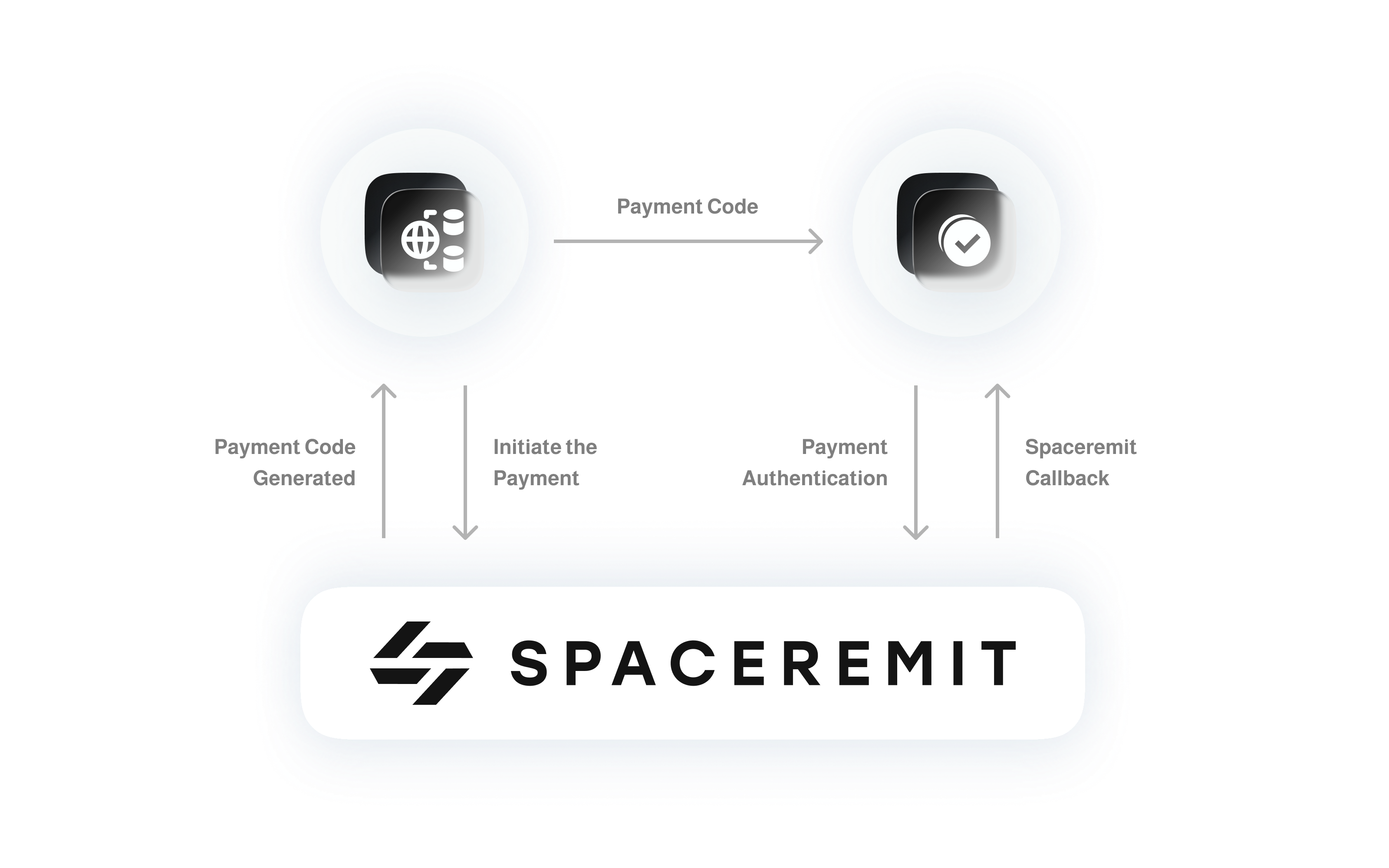
Upon completion of the payment process, Spaceremit will automatically append an additional input tag with name is SP_payment_code to the payment form.Also, Spaceremit will automatically trigger the SP_SUCCESSFUL_PAYMENT(spaceremit_code) function. This is a unique code represent a transaction id. It is imperative to verify the authenticity of this code to ensure the integrity of the payment process.(that will done in the next step-in server side-).
curl https://spaceremit.com/api/v2/payment_info/ \
-X POST \
-H "Content-Type: application/json" \
-d '{"private_key":"YOUR_SECRET_KEY","payment_id":"PAYMENT_ID"}'
Explanation:
This command is used to send a request to the Spaceremit API endpoint using the cURL command-line tool. The request is aimed at retrieving payment information from Spaceremit to complete the payment process.
curl: The command used to send HTTP requests from the command line.https://spaceremit.com/api/v2/payment_info/: The URL address of the API endpoint to which the request is sent.-X POST: Specifies that the request should be of type POST, indicating that data is being sent to the server.-H "Content-Type: application/json": Specifies the request header to indicate that the content type is JSON, meaning the data sent will be in JSON format.-d '{"private_key":"YOUR_SECRET_KEY","payment_id":"PAYMENT_ID"}': Specifies the data sent in the request, which is in JSON object format containing the private key and payment ID. "YOUR_SECRET_KEY" and "PAYMENT_ID" should be replaced with actual values(SP_payment_code field from the previous form).{
"response_status": "success",
"message": "",
"data": {
"id": "SP21CqDJzj4QRUCGebvwQFkJm7DVTMIlG4bcWSy0SvRd2uh90kjtyuY",
"type": "Deposit",
"currency": "USD",
"total_amount": "1.00",
"total_fees": "0.00",
"total_service_tax": "0.00",
"total_added_tax": "0.00",
"original_amount": "1.00",
"buyer_payed_amount": "1.00",
"buyer_total_fees": "0.00",
"buyer_sevice_tax": "0.00",
"buyer_added_tax": "0.00",
"buyer_fees_map": "{\"Spaceremit_Api_Tax\":\"0.00\",\"Added_Fees\":\"0.00\"}",
"seller_received_amount": "1.00",
"seller_total_fees": 0,
"seller_sevice_tax": "0.00",
"seller_added_tax": 0,
"seller_fees_map": "{\"Spaceremit_Api_Tax\":\"0.00\",\"Added_Fees\":0}",
"seller_public_key": "pkUSWNYV6Z1DGBN1AQSNJ7I0SOIZZRHTHJSIMU5O2ZNA72RX9UJGNSG",
"date": "2024-03-02 06:34:28",
"status": "Test payment",
"notes": "",
"status_tag": "T"
}
}
buyer_service_tax + buyer_added_tax The total fees paid by the buyer.seller_service_tax + seller_added_tax The total fees for the seller.This relationship illustrates the correspondence between the transaction status and its corresponding tag. Each specific transaction status is assigned a tag for easy reference and efficient processing. Through this relationship, programmers or systems can quickly identify the transaction status by checking its corresponding tag.
{
  "response_status": "success",
  "message": "",
  "data": {
    "id": "SP21CqDJzj4QRUCGebvwQFkJm7DVTMIlG4bcWSy0SvRd290kjtyuY",
    "type": "Deposit",
    "currency": "USD",
    "total_amount": "1.00",
    "total_fees": "0.00",
    "total_service_tax": "0.00",
    "total_added_tax": "0.00",
    "original_amount": "1.00",
    "buyer_payed_amount": "1.00",
    "buyer_total_fees": "0.00",
    "buyer_sevice_tax": "0.00",
    "buyer_added_tax": "0.00",
    "buyer_fees_map": "{\"Spaceremit_Api_Tax\":\"0.00\",\"Added_Fees\":\"0.00\"}",
    "seller_received_amount": "1.00",
    "seller_total_fees": 0,
    "seller_sevice_tax": "0.00",
    "seller_added_tax": 0,
    "seller_fees_map": "{\"Spaceremit_Api_Tax\":\"0.00\",\"Added_Fees\":0}",
    "seller_public_key": "pkUSWNYV6Z11AQSNJ7I0SOIZZRHTHJSIMU5O2ZNA72RX9UJGNSG",
    "date": "2024-03-02 06:34:28",
    "status": "Test payment",
    "notes": "",
    "status_tag": "T"
  }
}
Steps for Adding Websites:
Central to our security framework is the use of encryption protocols that encrypt customer card details before they are transmitted over the network. By employing industry-standard encryption algorithms, we ensure that sensitive information is transformed into unreadable ciphertext, thereby rendering it virtually impenetrable to unauthorized access or interception. This encryption process not only secures data during transmission but also ensures that it remains protected within our systems, guarding against potential breaches or data compromises.
Moreover, Spaceremit adheres to stringent security standards and compliance requirements to uphold the highest levels of data protection. Our systems are continuously monitored and audited to identify and address any vulnerabilities or potential security risks proactively. We also implement robust access controls and authentication mechanisms to restrict unauthorized access to sensitive data, further bolstering the security posture of our platform.
In addition to encryption and access controls, Spaceremit employs cutting-edge technologies and practices to enhance the overall security of your customers' card data. Our infrastructure is designed with redundancy and failover mechanisms to ensure continuous availability and resilience against potential threats or disruptions. Furthermore, we employ real-time monitoring and anomaly detection systems to promptly identify and mitigate any suspicious activities or unauthorized access attempts.
By prioritizing security, Spaceremit provides you with the confidence and assurance that your customers' card data is protected with the utmost care and diligence. With our advanced security measures in place, you can rest assured that transactions conducted through our platform are conducted in a secure and trustworthy environment, preserving the confidentiality and integrity of your customers' sensitive information.
 Watch the video (PHP)